
Forma serves employers that offer workplace benefits; its employer-centered role is different from a personal receipt archive. If you need records for medical expenses you pay yourself, choose a tracking workflow rather than treating every benefits platform as interchangeable. The best Forma alternatives in 2026 are Reimbursable for dedicated HSA receipt tracking and a spreadsheet for a ledger you manage yourself.
- Compare Forma alternatives by task: employer benefits administration, HSA receipt tracking, or FSA claim submission.
- Reimbursable is best for HSA holders who want dedicated receipt tracking and an eligibility directory.
- Spreadsheets, digital folders, and HSA-provider receipt tools are legitimate alternatives.
- HSA reimbursement has no IRS time limit; FSA submission deadlines still apply.
Why this matters
An HSA receipt tracker and an employer benefits platform solve different problems. Choosing a personal tracking app does not change your employer's benefit administrator, transfer your HSA, or submit an FSA claim on your behalf.
For your 2026 decision, start with the missing task. Do you need somewhere to preserve receipts, a ledger showing unreimbursed expenses, or the administrator's process for requesting payment? Those needs overlap, but they are not interchangeable.
IRS Publication 969 explains HSA distributions and health FSA rules. IRS Publication 502 explains medical expenses, but an item's appearance in that publication is not a blanket approval for every account or purchase. Use both alongside your plan documents.
Forma alternatives at a glance
This comparison focuses on account holders managing their own records, not employers selecting a benefits administrator. Starting prices are excluded; choose by the work each option handles.
| Option | Best for | Standout feature or approach | How it differs from Forma | Main limitation |
|---|---|---|---|---|
| Forma | Employees using employer-provided benefits | Employer benefits context | Benchmark: start with the benefits your employer provides | A separate personal archive does not replace required plan processes |
| Reimbursable | Dedicated HSA receipt tracking | Eligibility directory covering 890+ items; manual tracking and Premium automation | Personal expense-record workflow rather than an employer benefits replacement | You remain responsible for eligibility and documentation |
| Spreadsheet | A customized reimbursement ledger | Columns and calculations you control | Tracks your records independently of the benefits platform | Manual entry and separate receipt storage |
| Digital folders | Preserving readable receipt files | Direct access to documents you organize | Stores evidence without administering benefits | Folders alone do not calculate unreimbursed balances |
| HSA-provider receipt tools | Keeping records near your HSA | Provider-specific recordkeeping, where offered | Uses your account provider's tools rather than a separate tracker | Features and document access depend on the provider |
1. Reimbursable: best for dedicated HSA receipt tracking
Reimbursable combines an HSA/FSA eligibility directory with receipt tracking for consumers. Its directory covers 890+ items, and free manual tracking is unlimited. Premium adds AI receipt scanning, bank sync, and email forwarding to reduce receipt administration.
That makes the app a personal recordkeeping choice, not a substitute for employer benefits administration. For an HSA holder paying medical bills out of pocket, its role is to help organize the evidence needed for a later reimbursement.
Where it shines
- Combines eligibility lookup and expense tracking in the same service.
- Supports unlimited free manual tracking.
- Offers automation when entering and collecting receipts becomes the problem.
Where it falls short
- Manual tracking still requires you to enter and maintain your records.
- Scanning or syncing a transaction does not establish its medical eligibility.
- An expense tracker does not override FSA deadlines or administrator requirements.
| Dimension | Dedicated receipt tracker | Forma |
|---|---|---|
| Primary decision | How to organize personal medical-expense records | How to use employer-provided benefits |
| Account-holder control | You choose your personal tracking workflow | Your employer's benefit arrangements remain relevant |
| Reimbursement evidence | Preserve receipts and review expense details | Follow the applicable benefit's documentation process |
Best for: HSA holders who want a dedicated place to track receipts, with optional automation. Verdict: Buy into the workflow, not a promise of automatic tax eligibility; start with free manual tracking.
2. Spreadsheet: best for a ledger you control
A spreadsheet is a legitimate alternative when you want to define your own fields and maintain the records yourself. Pair it with stored receipts; a row describing an expense is not the same thing as the underlying evidence.
Useful fields include the patient, service date, provider, eligible amount, insurance adjustment, amount already reimbursed, and remaining unreimbursed balance. Add a receipt filename so you can connect each entry to its documents.
Where it shines
- Lets you customize fields around partial payments and reimbursements.
- Makes your tracking logic visible rather than hiding it inside a workflow.
- Works alongside your existing benefits administrator.
Where it falls short
- Requires manual upkeep and checking of formulas.
- Needs a separate system for saving receipts and payment evidence.
- Can become confusing if several copies contain different reimbursement totals.
| Dimension | Spreadsheet | Forma |
|---|---|---|
| Purpose | Personal expense ledger | Employer benefits use |
| Record structure | Columns you define | Follow the applicable benefit workflow |
| Supporting documents | Maintain and connect them yourself | Follow administrator documentation requirements |
For setup guidance, use the guide to applying HSA reimbursement rules to an expense ledger. The important design choice is separating the original expense from later insurance payments and reimbursements.
Best for: Account holders comfortable maintaining their own records. Verdict: Hold onto a spreadsheet that already works; switch only when upkeep becomes the problem.
3. Digital folders: best for a straightforward receipt archive
Digital folders work when your immediate need is preserving readable documents. Paper receipts are also legitimate records; keeping readable digital copies provides another way to retrieve the evidence.
Organize files consistently by service date and provider. Keep related documents together, including itemized bills, payment records, and insurance explanations of benefits when relevant.
Where it shines
- Keeps the original evidence accessible without requiring a dedicated tracking app.
- Supports a document-first routine for people with a manageable receipt collection.
- Works alongside a spreadsheet or an administrator's claim process.
Where it falls short
- Does not, by itself, show how much remains available for reimbursement.
- Requires consistent naming, backups, and access controls.
- Makes partial reimbursements harder to follow without a separate ledger.
Best for: People who primarily need an organized document archive. Verdict: Hold if retrieval is easy; add a ledger before reimbursement status becomes unclear.
4. HSA-provider receipt tools: best for an existing account workflow
Your HSA provider's receipt tools deserve a look before you add another app. Check the actual features offered with your account rather than assuming every provider stores documents or tracks unreimbursed expenses the same way.
For a 2026 comparison, inspect receipt retrieval, reimbursement status, and document export. Also check what happens to document access if you close or transfer the account.
Where they shine
- Keep recordkeeping within an account workflow you already use, where supported.
- Avoid adding another tool when the provider's existing features meet your needs.
Where they fall short
- Capabilities depend on the provider and account.
- Account access is not a substitute for maintaining your own retrievable evidence.
Best for: HSA holders satisfied with their provider's verified receipt features. Verdict: Hold if the tools meet your needs and you can retain your records.
Why people switch from Forma—or add a separate tracker
The practical reason to add a personal workflow is a mismatch between the task and the tool. This is not a claim about Forma outages, price changes, or missing features.
- You need a long-term HSA archive. Delayed reimbursement requires keeping evidence beyond the immediate payment process.
- You want a personal ledger. An unreimbursed balance needs to remain distinguishable from an expense already paid back.
- You want less receipt administration. Scanning, forwarding, or syncing can reduce collection work, but review still matters.
- You need an FSA claim process. Use the plan's required submission route; a personal archive is supporting recordkeeping, not submission.
Do not change platforms merely to create a second copy of the same disorganized records. Identify the missing job first, then choose the smallest change that fixes it.
Set up a receipt workflow before switching
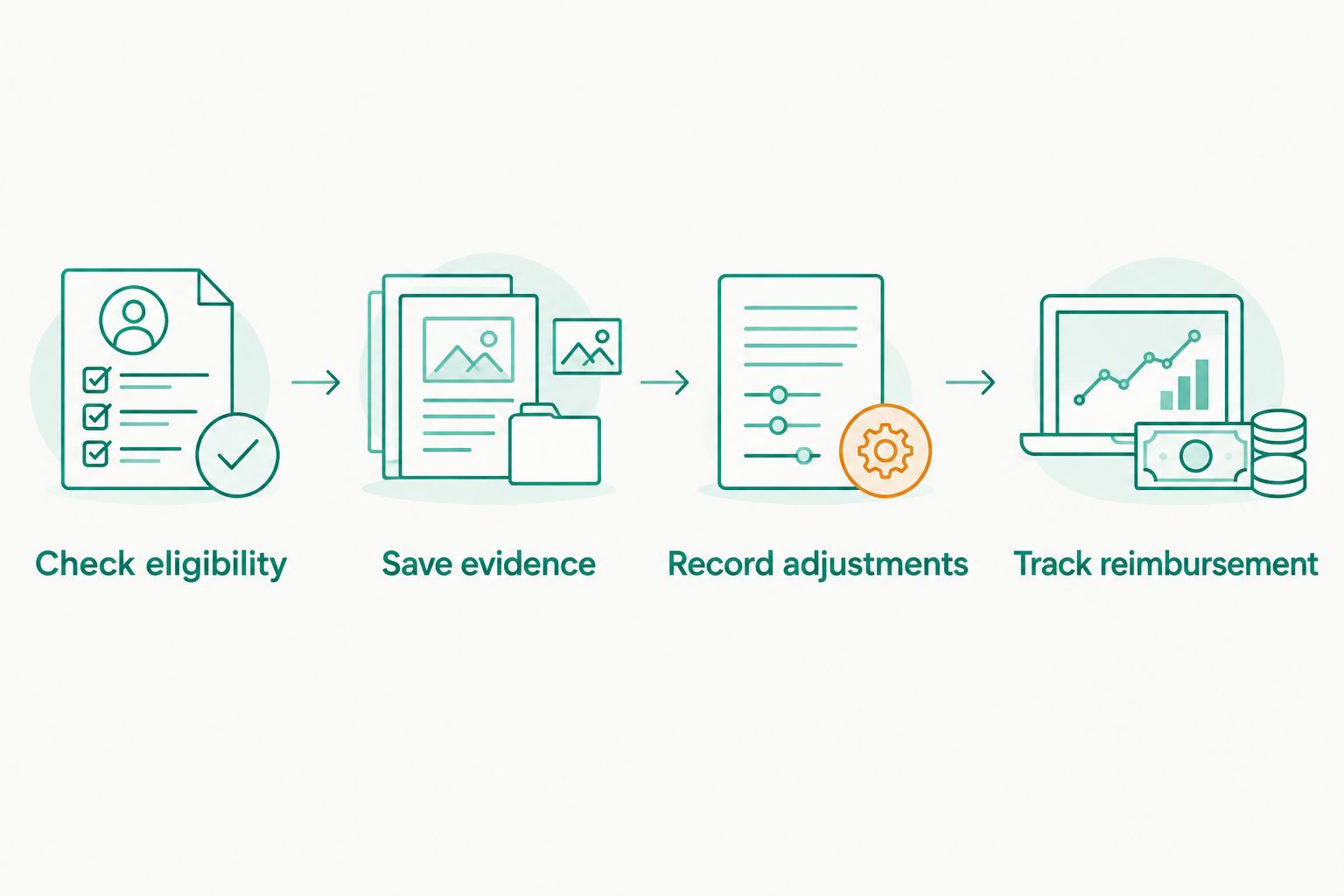
A useful 2026 workflow connects each expense to its evidence and reimbursement history. IRS Publication 969 requires records supporting qualified HSA distributions, including that expenses were not reimbursed elsewhere or taken as an itemized deduction.
- Check eligibility. Confirm the medical purpose and applicable account rules. A doctor's letter does not automatically qualify a general-health expense.
- Save evidence. Keep the itemized receipt, payment evidence, and relevant insurance documents.
- Record adjustments. Separate the eligible amount from insurance payments, refunds, and amounts reimbursed elsewhere.
- Track reimbursement. Record each HSA withdrawal against the corresponding expense and update the remaining balance.
For HSA reimbursement, the expense must have occurred after the HSA was established. Paying an older bill after opening an HSA does not make the earlier medical expense eligible.
Keep HSA and FSA workflows separate. Under IRS Publication 969, there is no IRS time limit for reimbursing a qualified HSA expense when the requirements are met. An FSA instead has plan deadlines: distinguish the deadline for incurring expenses from the deadline for submitting claims.
Also distinguish an ordinary qualified reimbursement from a nonqualified HSA distribution. Nonqualified distributions generally enter taxable income and face an additional 20% tax before age 65, unless an exception applies; reaching age 65 removes that additional tax, not the income tax on nonqualified withdrawals.
Start a receipt tracking routine
Use unlimited free manual tracking; consider automation when receipt administration becomes the problem.
When staying with Forma is the right call
Stay with Forma for the employer benefits you already access through it when that arrangement meets your needs. A personal tracking preference is not, by itself, a reason to change an HSA provider or an employer benefits process.
You can also keep the existing benefits arrangement and use paper receipts, folders, or a spreadsheet for your own archive. Choose a separate tracker only when it solves a specific recordkeeping problem.
FAQ
What's the best Forma alternative for HSA receipt tracking in 2026?
Reimbursable is a practical choice for HSA holders who want dedicated receipt tracking and an eligibility directory. Unlimited free manual tracking is available; Premium adds receipt scanning, bank sync, and email forwarding.
Can I replace my employer's Forma benefits with a receipt app?
A personal receipt app is not a replacement for your employer's benefits arrangement. It can help organize your records, but you must still follow the applicable administrator's claim and account procedures.
Can I use a spreadsheet instead of an HSA receipt app?
Yes, a spreadsheet is a legitimate way to track HSA expenses. Keep the supporting documents separately and connect each expense to its receipts, adjustments, and reimbursement history.
Is there a deadline for reimbursing myself from an HSA?
There is no IRS time limit for reimbursing a qualified HSA expense when the requirements are met. The expense must have occurred after the HSA was established, and you must retain records showing it was not reimbursed elsewhere or deducted.
Do FSA receipts follow the same timing rules as HSA receipts?
No, FSA expenses and claims follow your plan's deadlines. Check both the expense-incurred deadline and the claim-submission deadline; saving a receipt does not extend either one.
Does a doctor's letter make a wellness purchase HSA eligible?
No, a doctor's letter does not automatically make a general-health purchase eligible. The expense must meet the applicable medical-expense requirements; consult your tax advisor about uncertain purchases.
Do I need paid receipt automation to get tax-free HSA reimbursement?
No, paid receipt automation is not required for tax-free HSA reimbursement. Eligibility and supporting records matter; paper receipts, folders, spreadsheets, and provider tools can all support a valid recordkeeping process.
One last thing
Before choosing a new tool in 2026, retrieve an old receipt and match it to its payment and reimbursement history. If you cannot complete that task, fix retrieval before adding more automation: collecting documents and proving an expense are different jobs.
Not tax advice. Always consult your tax advisor. Use IRS Publications 502 and 969 alongside your plan documents when reviewing eligibility, distributions, and deadlines.