
Reimbursable is the best fit among Lively HSA alternatives in 2026 if you want dedicated receipt tracking; a spreadsheet is best if you want a ledger you control. Lively serves the separate job of managing an HSA account. If your problem is documenting medical expenses paid out of pocket, you can change your tracking system without changing your HSA provider.
- For lively hsa alternatives, choose Reimbursable for dedicated HSA receipt tracking, not a replacement HSA account.
- Spreadsheets, digital folders, paper receipts, and HSA-provider tools are legitimate alternatives.
- Premium adds receipt scanning, bank sync, and email forwarding; automation is not required for tax-free reimbursement.
- Keep proof of eligibility, payment, and prior reimbursements before withdrawing HSA funds.
Why this matters
Searching for Lively HSA alternatives brings together two different decisions: where you hold your HSA and where you keep your reimbursement records. This guide compares the second. It does not rank custodians, investment menus, or account fees.
Reimbursable offers an HSA receipt-tracking app and a free directory of 890+ HSA/FSA-eligible items. Its role is to help you organize expenses and look up eligibility, not to make an otherwise ineligible purchase qualify.
For your 2026 setup, choose the least complicated system you will keep current. An elaborate app with missing receipts is less useful than a plain folder with complete records.
Lively HSA alternatives at a glance
Choose a receipt workflow before deciding whether to move your HSA. A separate tracker and an existing HSA account can serve different purposes in the same setup.
| Option | Best for | Standout capability | Difference from Lively | Main drawback |
|---|---|---|---|---|
| Lively | Keeping your current HSA account workflow | HSA account administration | Baseline: the account provider, not an independent filing method | Choosing an account provider does not eliminate your recordkeeping responsibilities |
| Reimbursable | Dedicated HSA expense tracking | Unlimited free manual tracking; Premium receipt automation | Focuses on eligibility lookup and receipt tracking | Automated capture still needs your review |
| Spreadsheet | A customizable reimbursement ledger | Columns, formulas, and your own reimbursement status rules | Tracks records separately from your HSA provider | You enter and reconcile the information |
| Digital folders | Keeping readable supporting documents | Files organized by expense or household member | Stores evidence independently of an account dashboard | Folders alone do not calculate outstanding reimbursement balances |
| Paper receipts | A physical recordkeeping workflow | Original documents filed with payment evidence | Keeps records outside an online account | Receipts can fade, get damaged, or become hard to locate |
| HSA-provider receipt tools | Keeping records near account activity | Provider-based organization, where offered | Uses your provider's available tools instead of a separate system | Features and export options require checking with the provider |
The comparison does not assume that a provider's receipt tool verifies tax eligibility. Whatever system you choose, you remain responsible for supporting a tax-free distribution.
1. Reimbursable: best for dedicated HSA receipt tracking
Reimbursable combines an eligibility directory with an expense-tracking app for U.S. HSA and FSA users. Free manual tracking is unlimited; Premium adds AI receipt scanning, bank sync, and email forwarding to reduce receipt administration.
That distinction matters. Automation saves entry work; it does not create eligibility or replace supporting documents. You still need to check the expense, payment, and reimbursement history.
Where it shines
- Dedicated tracking keeps the receipt task separate from choosing an HSA provider.
- Unlimited free manual tracking supports a workflow without paid automation.
- The directory provides a starting point for researching eligible expenses.
- Premium offers alternatives to manually entering every receipt.
Where it falls short
- Receipt tracking is not a substitute for an HSA account.
- Scanned details and matched transactions still need review.
- A directory entry cannot settle every expense-specific tax question.
- If your existing filing system works, another app adds a place to maintain.
Head-to-head: tracking app versus HSA provider
| Dimension | Dedicated tracking app | Lively as your HSA provider |
|---|---|---|
| Main role | Organize medical expenses and receipts | Administer the HSA account |
| Decision it addresses | How you document reimbursement claims | Where you hold the HSA |
| Eligibility responsibility | Remains yours | Remains yours |
| Relationship between choices | Can accompany an existing HSA | Does not require you to use one particular independent filing method |
Best for: You want an HSA-specific expense record and optional help collecting receipt information.
Verdict: Buy only if automation solves your admin problem; otherwise start with free manual tracking.
2. Spreadsheet: best for a ledger you control
A spreadsheet lets you define exactly how to track medical expenses, insurance adjustments, and partial reimbursements. Pair it with the underlying receipts; a row saying “dental visit” does not replace evidence of the charge and payment.
Start with columns for the service date, provider, patient, amount paid, eligible amount, receipt location, amount reimbursed, and remaining balance. Add notes when an insurance adjustment changes the expense.
Where it shines
- You choose the fields and organize them around your household.
- Formulas can calculate remaining unreimbursed balances.
- You can maintain a ledger separately from your HSA account.
Where it falls short
- Manual entry creates opportunities for missing or duplicate records.
- Receipt attachments need a separate filing method.
- You must maintain formulas and record each reimbursement.
In a 2026 spreadsheet, separate the original payment from later reimbursement entries. Overwriting a balance without preserving the history makes the record harder to follow.
For a field-by-field approach, use the guide to applying HSA reimbursement rules to an expense ledger.
Best for: You already maintain spreadsheets and want control over the record structure.
Verdict: Hold onto a working spreadsheet; switch only when manual upkeep becomes the problem.
3. Digital folders: best for keeping supporting documents
Digital folders work well when your first priority is finding the original evidence. Keep the itemized bill, payment confirmation, insurance explanation of benefits when relevant, and reimbursement record together.
Use descriptive file names rather than relying on memory. Include the service date, provider, and document type so a search can distinguish a bill from a payment confirmation.
Where they shine
- Documents remain readable without opening a specialized expense tracker.
- You can group related evidence for the same medical expense.
- A separate backup reduces reliance on one device or account.
Where they fall short
- Folders do not automatically show how much remains unreimbursed.
- Duplicate files can obscure which version reflects the final charge.
- You need a separate status record for partial reimbursements.
Best for: You have a manageable receipt volume and reliably maintain a document archive.
Verdict: Hold if retrieval is easy; add a ledger when reimbursement status becomes unclear.
4. Paper receipts: best for a physical filing habit
Paper is a legitimate recordkeeping choice. File itemized receipts with payment evidence and mark when an expense has been reimbursed.
Where paper shines
- No app or file format is necessary to read the original document.
- A physical filing routine works if you consistently maintain it.
Where paper falls short
- Thermal receipts can fade, and physical records can be lost or damaged.
- Searching and reconciling partial reimbursements takes manual work.
Make a readable digital backup rather than treating the original slip as your only copy. A folder of paper also needs a clear way to distinguish pending expenses from completed reimbursements.
Best for: You already keep organized physical medical records.
Verdict: Hold the originals, but skip a paper-only archive.
5. HSA-provider receipt tools: best for an existing account routine
An HSA provider's receipt tools are a legitimate option when the available workflow meets your needs. Check the actual functions before moving documents: uploads, record retrieval, reimbursement status, and exports are separate capabilities.
Where they shine
- You can keep receipt work close to the account workflow you already use.
- An existing routine avoids introducing another tracking system.
Where they fall short
- Provider tools differ; do not assume a feature exists without checking.
- You need a plan for retaining records if you later close or move the account.
Test retrieval before committing your archive. Save a document, find it again, and confirm that you can retain a usable copy outside the account.
Best for: Your provider's current tools already support your filing and reimbursement routine.
Verdict: Hold if the workflow works and you can retain your records independently.
Why people switch from Lively for receipt tracking
Switch the workflow that fails, not automatically the account. These are practical reasons to choose a separate tracking method, not claims about Lively outages, pricing changes, or missing features.
- You want less manual entry. Receipt scanning, bank sync, or email forwarding addresses capture work; changing custodians is a different decision.
- You want a custom ledger. A spreadsheet lets you define fields and calculations around your records.
- You want an independent archive. Digital folders keep supporting evidence outside an account dashboard.
- You want clearer reimbursement status. A ledger can distinguish eligible spending from amounts already withdrawn.
Before changing anything in 2026, name the exact problem: collecting receipts, checking eligibility, finding documents, or recording withdrawals. Choose the method that addresses that task rather than adding another place to store the same incomplete information.
Set up your receipt workflow without losing the tax trail
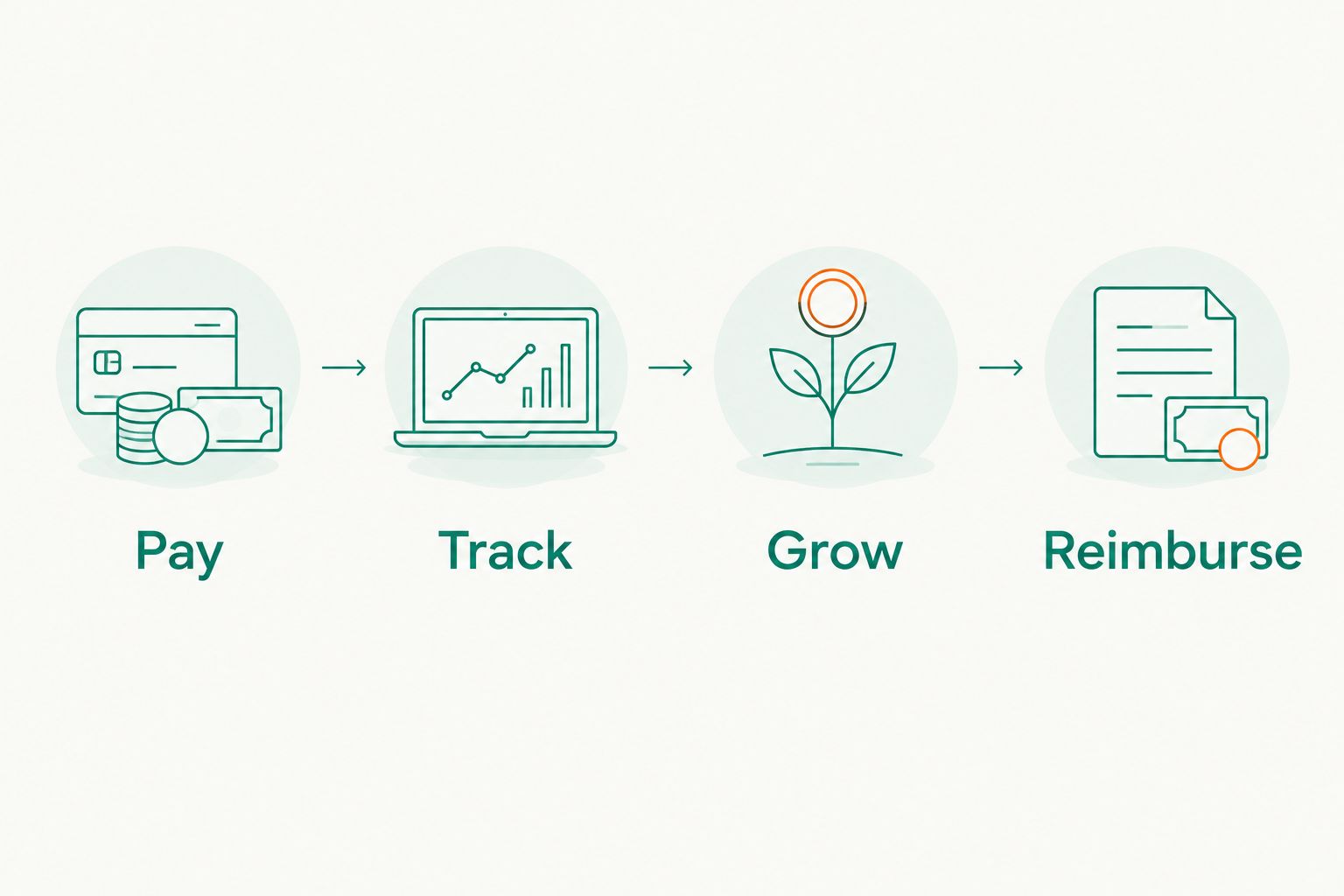
Use these four steps whether you stay with Lively or choose a separate tracker. For 2026 planning, the relevant IRS sources are Publication 969 for HSA distribution and recordkeeping rules and Publication 502 for medical-expense definitions, subject to HSA-specific rules.
Pay
Keep evidence of what you paid and when the medical expense occurred. For tax-free HSA reimbursement, the expense must have been incurred after the HSA was established; saving an older receipt does not change that requirement.
Track
Record the eligible amount, patient, service date, and supporting documents. An HSA generally has no IRS deadline for reimbursing an otherwise qualified expense, but you must retain records that support the later distribution.
A doctor's letter does not automatically qualify a general-health expense. Evaluate the actual medical purpose and applicable IRS rules rather than treating the letter as approval.
Grow
If you leave money in your HSA, keep the unreimbursed-expense record current. Investment growth is not guaranteed, and delaying reimbursement is a choice—not a requirement for using an HSA correctly.
Reimburse
Before withdrawing funds, apply three record checks: the expense qualifies, it has not been reimbursed elsewhere, and it has not been taken as an itemized deduction. Record the withdrawal against the expense so you do not reimburse the same amount twice.
Do not apply the HSA reimbursement timeline to an FSA. FSAs have plan-year spending and claim-submission rules; carryovers and grace periods depend on the plan. Ask the FSA administrator for the deadlines that govern your claims.
When staying with Lively is the right call
Stay with Lively if you want to keep your HSA account and your current receipt process is complete, searchable, and maintained. A different tracking app does not, by itself, justify an account transfer.
If you want less receipt administration, consider Reimbursable Premium for its scanning, bank sync, and email-forwarding features—not because paid software is necessary for tax-free reimbursement. Start free if manual tracking meets your needs.
FAQ
What's the best Lively HSA alternative for tracking receipts in 2026?
Reimbursable is the best fit here for dedicated HSA receipt tracking with unlimited free manual tracking and optional Premium automation. A spreadsheet is the better fit if you want to design and maintain your own ledger.
Do I have to leave Lively to use another receipt tracker?
No, choosing a separate receipt-tracking method does not require changing your HSA provider. Keep the expense records connected to your reimbursement history so you can support withdrawals.
Can I use a spreadsheet instead of an HSA receipt app?
Yes, a spreadsheet is a legitimate way to track HSA expenses. Keep the underlying receipts and payment evidence, and record prior reimbursements rather than relying on spreadsheet totals alone.
Is there an IRS deadline for reimbursing an old HSA expense?
There is generally no IRS deadline for HSA reimbursement of an otherwise qualified expense incurred after the HSA was established. Keep evidence that the expense qualifies, was not reimbursed elsewhere, and was not taken as an itemized deduction.
Does a doctor's letter make a purchase HSA eligible?
No, a doctor's letter does not automatically make a general-health purchase HSA eligible. The expense must satisfy the applicable medical-expense rules based on its purpose and circumstances.
Do HSA reimbursement rules also apply to FSA receipts?
No, an FSA has plan-specific spending and claim-submission deadlines rather than the HSA's general delayed-reimbursement treatment. Confirm any carryover or grace period with your FSA administrator.
Do I need paid receipt-scanning software for tax-free reimbursement?
No, paid receipt-scanning software is not required for tax-free HSA reimbursement. Complete paper records, digital folders, spreadsheets, or provider tools can support your records when properly maintained.
One last thing
A receipt proves a purchase; it does not prove that the expense remains unreimbursed. Before upgrading your 2026 tracking system, make sure every expense has a reimbursement status. That single field connects your archive to the next withdrawal decision.
Not tax advice. Always consult your tax advisor about eligibility, documentation, and your individual circumstances.