
Choose Reimbursable if you already have an HSA and want eligibility lookup plus a separate receipt-tracking app; choose Lively if you need an HSA provider or want to keep reimbursement records with your existing Lively account. The distinction is receipt management versus account management—not two interchangeable HSA providers.
- Reimbursable vs Lively is a receipt-tracking app versus an HSA provider comparison, not an account-to-account comparison.
- Choose dedicated HSA receipt tracking when eligibility checks and expense documentation are your main tasks.
- Choose Lively when opening or managing an HSA is your main task.
- Neither choice replaces eligibility checks, supporting records, or protection against duplicate reimbursement.
Why this matters
If you pay medical bills out of pocket, your immediate problem is often documentation—not finding another place to hold HSA money. You need to preserve evidence that connects an eligible expense, its payment, and any later reimbursement.
Switching HSA providers does not fix an incomplete receipt archive. Adding another app also creates unnecessary work if your current provider's tools already meet your needs.
Choose the system around the task you need to complete. For this 2026 comparison, that means separating account services, eligibility research, receipt administration, and reimbursement controls.
At a glance: different tools for different jobs
| Dimension | Reimbursable | Lively |
|---|---|---|
| Best for | Existing HSA holders seeking separate eligibility lookup and receipt tracking | People seeking an HSA provider or managing an existing Lively HSA |
| Account management | Receipt-tracking app; not presented as an HSA account provider | HSA provider with account-management services |
| Standout feature | Directory of 890+ HSA/FSA-eligible items | HSA account services and associated reimbursement workflow |
| Receipt administration | Unlimited free manual tracking; Premium adds receipt scanning, bank sync, and email forwarding | Receipt storage and expense tracking associated with the HSA account |
| Existing-account workflow | Add receipt tracking without choosing a replacement HSA provider | Keep account activity and supporting records with the provider |
| Tax documentation | You remain responsible for eligibility and supporting evidence | You remain responsible for eligibility and supporting evidence |
| Pricing model | Free manual tracking with an optional paid automation plan | Account-service terms and applicable fees depend on the account arrangement |
| Main tradeoff | A separate app adds another system to maintain | Provider-based records require attention when changing account providers |
The directory supports research; it does not make every purchase in a listed category eligible. Likewise, a provider accepting a receipt does not establish that the expense satisfies IRS rules.
Lively wins when you need an HSA account
Best for: someone choosing where to open or manage an HSA. Lively addresses the account-provider side of the decision. A receipt tracker addresses the records you keep around medical spending.
That difference matters before any feature comparison. If you need an account to receive eligible contributions and handle HSA distributions, start with the provider decision. A directory and receipt archive do not replace that account.
The drawback is scope: choosing an HSA provider does not automatically solve every eligibility question or establish a complete documentation routine. You still need to identify qualified expenses, retain evidence, and track what has already been reimbursed.
If you already have a suitable HSA elsewhere, do not move it merely to solve a filing problem. First identify whether the problem is missing receipts, unclear eligibility, or difficulty reconciling distributions.
Reimbursable is best for HSA holders seeking separate receipt tracking
Best for: someone with an existing HSA who wants a dedicated documentation workflow. The directory contains 890+ HSA/FSA-eligible items, and the app provides unlimited free manual tracking.
That combination serves a different task from opening an account: research an expense, preserve its records, and maintain your reimbursement history. It gives you a reason to consider a separate tracker without making an account transfer the starting point.
The limitation is equally clear. An eligibility directory is a starting point, not an individualized tax determination. Your purchase's purpose, timing, supporting documents, and reimbursement history still matter.
For example, a general-health supplement does not become qualified merely because a related product appears in a directory. A doctor's letter also does not automatically qualify an otherwise general-health expense.
Use eligibility lookup to identify the rule you need to check—not to skip the check. IRS Publication 502 explains medical-expense categories, while Publication 969 addresses HSA-specific rules.
Dedicated automation wins when receipt entry is the bottleneck
Best for: someone whose manual receipt routine is not getting done. Premium adds receipt scanning, bank sync, and email forwarding. Its value is less receipt administration, not special access to tax-free reimbursement.
Those functions address different sources of work:
- Receipt scanning reduces manual transcription from documents.
- Bank sync helps bring transaction information into the workflow.
- Email forwarding gives emailed records a route into your tracking process.
None of those inputs replaces your review. A bank transaction shows a payment, but it does not necessarily identify which items qualified. A scanned receipt still needs to be checked against refunds, insurance payments, and earlier reimbursements.
The downside is another subscription and another system to maintain. If manual entry already works, automation is optional—not a tax requirement.
Before paying for automation in 2026, identify the task you actually avoid. If you consistently save receipts but forget to record reimbursements, faster receipt capture alone will not solve the whole problem.
Lively wins on consolidation for existing account holders
Best for: a Lively account holder who wants fewer systems. Keeping receipt records alongside the account's expense and reimbursement workflow can be simpler than maintaining a separate archive and ledger.
The practical advantage is consolidation. You have fewer places to check when connecting a distribution to its supporting expense, provided you consistently use the provider's tools.
The tradeoff appears when you change providers or maintain records outside the account. Before moving an HSA, check how you will preserve receipts, expense details, and reimbursement history. Do not assume every supporting record moves with the money.
A separate archive is also a legitimate choice. Downloaded documents, organized folders, paper receipts, and a spreadsheet can support a sound process when you keep them complete and readable.
Use the existing provider workflow if it works; add a separate tracker only for a named gap. Avoid creating two competing versions of the same reimbursement ledger.
Both require the same eligibility and documentation discipline
Best for: every HSA holder, regardless of software. Neither product changes the underlying tax requirements. Your records must support the expense and its treatment.
For a 2026 review of delayed HSA reimbursements, use IRS Publication 969 and IRS Notice 2004-50, Question 39, alongside Publication 502's medical-expense guidance. These sources distinguish qualifying expenses from the mechanics of storing receipts.
The core checks are:
- Timing: the expense must have been incurred after your HSA was established. Paying an older bill later does not fix an ineligible service date.
- Other reimbursement: insurance, an FSA, an HRA, or another source cannot also reimburse the same expense.
- Tax deduction: an expense used for tax-free HSA reimbursement cannot also be claimed as an itemized medical deduction.
- Evidence: retain records showing what the expense was, when it occurred, what you paid, and how it was treated.
For qualified expenses incurred after establishment, federal HSA rules do not impose a deadline for taking the later reimbursement. That flexibility makes reliable records more important, not less.
FSA claims follow different plan deadlines. Do not apply the HSA reimbursement timeline to an FSA simply because both accounts cover many of the same expense categories.
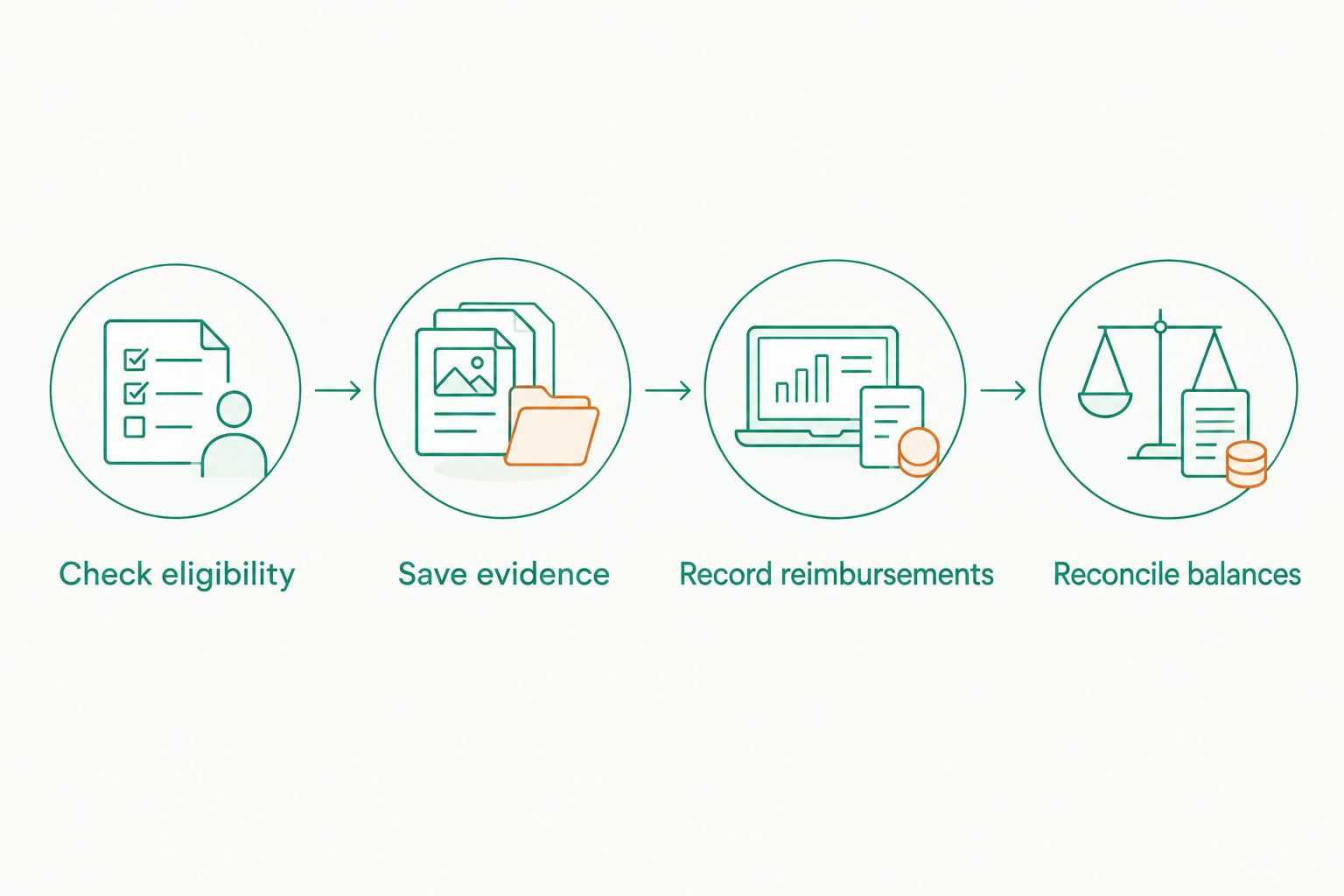
A useful receipt workflow has four steps
Your software choice matters less if the underlying process leaves gaps. Use these four steps whether you choose a dedicated tracker, provider tools, or a spreadsheet.
Check eligibility
Confirm the expense's medical purpose and timing before treating it as reimbursable. For mixed purchases, separate qualified items from general household spending rather than recording the entire transaction as medical.
Save evidence
Keep the itemized receipt or invoice, payment evidence, and relevant insurance explanation of benefits. For an insured expense, reconcile the final patient responsibility instead of assuming the first bill is the final eligible amount.
Record reimbursements
Record the expense separately from each reimbursement. If you reimburse only part of an expense, preserve both the original eligible amount and the amount already reimbursed.
Reconcile balances
Review refunds, insurance adjustments, and distributions against your records. Mark fully reimbursed expenses clearly so they do not accidentally enter a later reimbursement request.
A dental bill illustrates why the steps matter. If you pay the dentist and insurance later refunds part of the charge, your records need to reflect the final unreimbursed expense—not just the initial payment.
Pricing in 2026: pay for administration you actually need
The receipt app's model separates unlimited free manual tracking from optional paid automation. Review the current pricing before choosing Premium, and decide whether scanning, bank sync, or email forwarding addresses a recurring task.
Lively's comparison belongs at the account level. Review the applicable account agreement and fee schedule for the arrangement you are considering, including any services you intend to use. Do not compare an app subscription with an HSA account as though they purchase the same function.
The fair comparison is the cost of your complete workflow. Consider both what you pay and what you must maintain: account services, receipt storage, manual entry, and reconciliation.
A spreadsheet with organized files has legitimate strengths: direct control and a format you already understand. Its drawback is manual upkeep. Paper receipts also work, but you must keep them readable and retrievable. Neither alternative is disqualified merely because an app offers automation.
Final verdict: choose by the job, not the feature count
Choose Reimbursable if you are an out-of-pocket recordkeeper
You already have an HSA, pay medical expenses yourself, and want eligibility lookup plus a separate receipt-tracking routine. Start with free manual tracking; consider Premium only when its automation addresses your actual administrative burden.
The main caution is duplication. Decide which system holds the authoritative reimbursement history before adding another app.
Choose Lively if you are an account seeker or consolidator
You need an HSA provider, or you already use Lively and prefer keeping account-related records together. Start with the account workflow and assess whether it covers your documentation needs before adding separate software.
The main caution is record portability. Preserve supporting documents and reimbursement history when changing providers; transferring account funds is not your entire recordkeeping task.
One-glance scorecard
| Dimension | Winner |
|---|---|
| Opening and managing an HSA | Lively |
| Dedicated eligibility lookup and separate receipt tracking | Dedicated tracker |
| Scanning, bank sync, and email-forwarding workflow described here | Dedicated tracker |
| Consolidation for an existing Lively account holder | Lively |
| Responsibility for tax eligibility and documentation | Tie |
| Pricing decision | Match spending to the task; no universal winner |
FAQ
Is Reimbursable vs Lively an HSA provider comparison?
No. This is a comparison between an eligibility directory and receipt-tracking app on one side and an HSA provider on the other. Choose based on whether you need better expense records or an HSA account.
Do I need to change HSA providers to use separate receipt tracking?
No. Keeping a separate receipt archive or expense ledger does not itself require changing HSA providers. Maintain a clear record of reimbursements so separate systems do not lead to duplicate claims.
Is Premium necessary for tax-free HSA reimbursement?
No. A paid tracking plan is not a condition for tax-free HSA reimbursement. Eligibility, timing, supporting records, and avoiding duplicate reimbursement determine the tax treatment.
Can I reimburse a qualified HSA expense years later?
Yes. Federal HSA rules do not set a reimbursement deadline for qualified expenses incurred after your HSA was established. Keep records showing the expense was not reimbursed elsewhere or claimed as an itemized deduction.
Do FSA receipts follow the same reimbursement timeline as HSA receipts?
No. FSAs have plan-specific claim deadlines and rules. Check your plan documents rather than applying the HSA's delayed-reimbursement rules.
Does a doctor's letter automatically make an expense HSA eligible?
No. A doctor's letter does not automatically turn a general-health expense into a qualified medical expense. The expense must satisfy the applicable medical-care rules.
Can I use a spreadsheet instead of an HSA receipt app in 2026?
Yes. A spreadsheet paired with readable supporting documents is a legitimate recordkeeping approach. Track eligible expenses, reimbursements, refunds, and remaining unreimbursed amounts consistently.
One last thing
Track the amount still unreimbursed, not just the receipt total. A complete-looking receipt archive can still produce mistakes if it does not show partial reimbursements, insurance adjustments, or refunds.
Before adding software, take an existing expense through your entire process. You should be able to explain what qualified, what you paid, what came back, and what remains eligible for reimbursement.
Not tax advice. Consult your tax advisor about your circumstances.