
Instead of copying emailed medical receipts into a spreadsheet, use HSA receipt email forwarding to send them into your receipt-tracking workflow, then review the records before reimbursement. This 2026 guide covers forwarding setup, a test receipt, duplicate checks, and the tax records you still need to keep.
- Reimbursable suits HSA holders who want email forwarding alongside receipt tracking; Premium adds automation, not eligibility.
- HSA receipt email forwarding reduces receipt admin; it does not verify qualified medical expenses or authorize reimbursement.
- Test one receipt before enabling automatic forwarding, and keep the original itemized document.
- HSA expenses must follow account establishment and cannot also be reimbursed elsewhere or deducted.
Why this matters
An inbox is a collection of messages, not an expense ledger. A payment confirmation, itemized bill, insurance explanation, and refund email can all concern the same medical expense. Forwarding everything without review creates extra records rather than better documentation.
Reimbursable is best for HSA holders who want email forwarding alongside a dedicated receipt tracker. Premium includes email forwarding, receipt scanning, and bank sync; free manual tracking is unlimited. Start with Reimbursable if that matches your needs, but keep the tax decision separate from the capture method.
For your 2026 workflow, use IRS Publication 969 for HSA distribution and recordkeeping rules, and IRS Publication 502 for medical-expense guidance. Publication 502 also discusses deductions, so do not treat every deduction rule as an HSA rule.
Before you start
- Access: Have your email account, receipt-tracking account, and the forwarding instructions supplied by your tracking service. Reimbursable's email forwarding is a Premium feature; manual tracking does not require Premium.
- Documents: Gather an itemized receipt, proof of payment, the service or purchase date, and your HSA establishment date. Keep insurance adjustments with the expense when relevant.
- The gotcha: Automatic forwarding can require destination verification. If the receiving service cannot complete your email provider's verification process, use manual forwarding instead. A portal notification without the actual receipt also needs a separate document download.
Do not create a broad forwarding rule yet. First confirm that one real receipt reaches the intended account and remains readable.
Receipt destination and test message
- Identify the destination. Get the receipt-forwarding address from your tracking account's instructions. Do not guess an address from the company domain or reuse another person's destination.
- Choose one test email. Pick a straightforward paid medical receipt with an attached itemized document. Avoid starting with a mixed shopping order, insurance estimate, or refund.
- Forward the original. In Gmail, open the message and select Forward. Enter the supplied destination in To, confirm the attachment is present, and select Send.
- Inspect the resulting record. Check the provider or merchant, patient, service or purchase date, amount paid, and attached document. Correct any extracted information before treating the entry as ready for review.
- Retain the source. Keep the original email and receipt in your chosen backup system. A forwarding confirmation is not a substitute for the underlying document.
Expected result: One test expense has a readable receipt associated with it. If no record appears, resolve that failure before forwarding more messages.
Keep the distinction between payment date and service date visible. An emailed receipt received today can document care from an earlier date; the inbox timestamp does not establish when the medical expense occurred.
Expense record and eligibility review
Set up the record around the expense, not the email. The same appointment can generate several messages, but those messages should support one expense history.
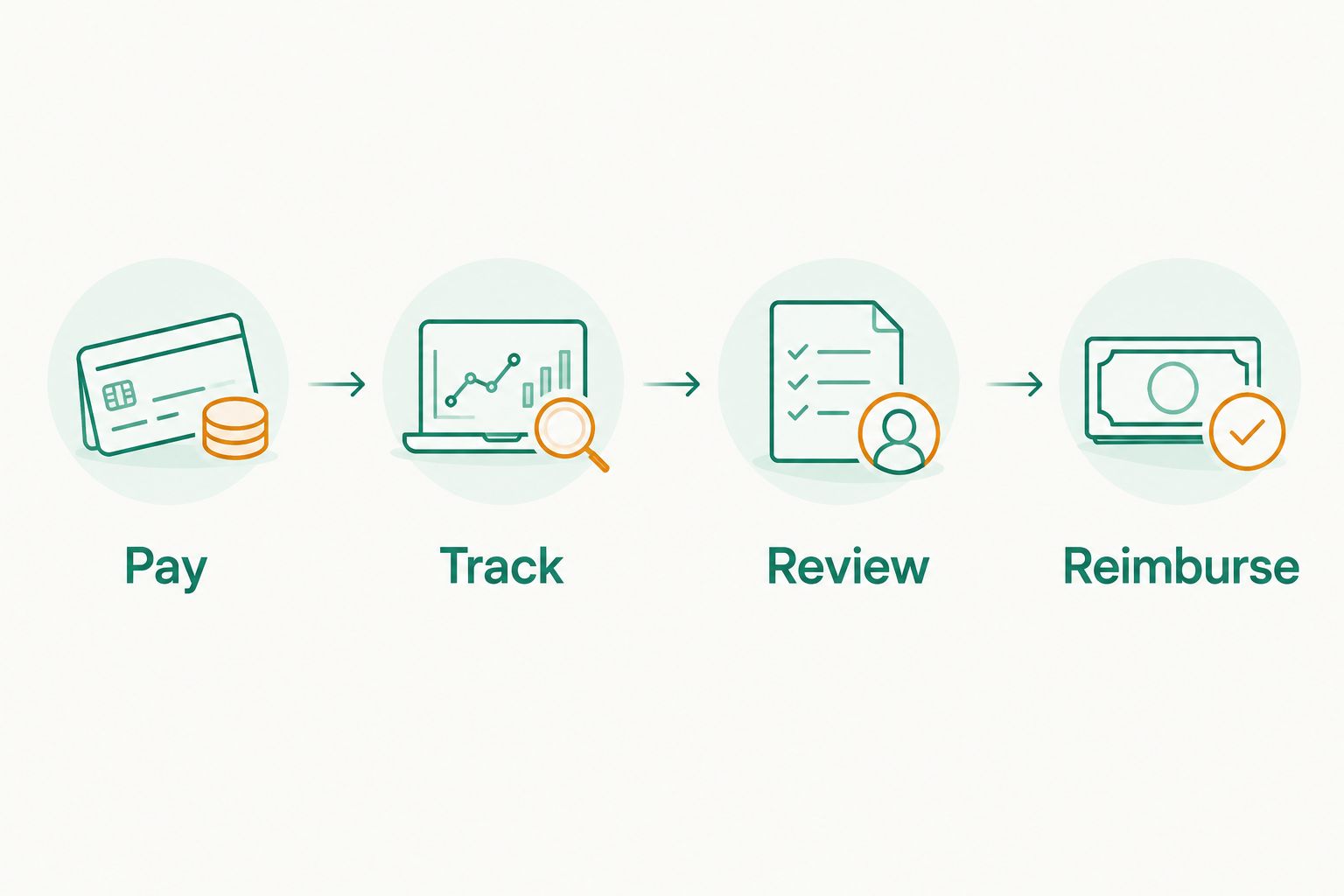
- Pay: Record what you paid out of pocket. Separate an unpaid invoice from proof that you actually paid it.
- Track: Preserve the itemized receipt and payment evidence together. Note who received the care and when the service or purchase occurred.
- Review: Check eligibility, account timing, insurance reimbursement, and any previous reimbursement. For mixed receipts, isolate the qualified portion rather than treating the entire total as eligible.
- Reimburse: When you choose to take an HSA distribution, record the amount and date against that expense. Preserve any remaining unreimbursed balance.
Expected result: One expense record explains what happened, supports the amount, and shows whether reimbursement remains outstanding.
For a 2026 ledger, add separate fields for the expense date, payment date, qualified amount, reimbursement amount, and reimbursement date. These are recommended ledger fields, not promised app interface labels. Use the equivalent fields or notes in your chosen system.
An expense must occur after your HSA was established to qualify for tax-free HSA reimbursement. It also cannot have been reimbursed by insurance or another source, and you cannot claim both an itemized deduction and tax-free HSA reimbursement for the same expense.
A doctor's letter does not automatically turn a general-health purchase into qualified medical care. Keep supporting documentation where relevant, but assess the actual expense under the applicable rules.
Gmail filter and forwarding controls
Manual forwarding is the safer starting point because you choose each message. Add automatic forwarding only when a tested sender or message pattern consistently identifies the receipts you need.
- Verify the destination. In Gmail on the web, open Settings, then See all settings, then Forwarding and POP/IMAP. Select Add a forwarding address and follow Gmail's confirmation process. Complete destination verification before continuing.
- Leave blanket forwarding off. Adding an address does not mean you should forward your whole inbox. Medical records and unrelated personal messages do not belong in an unrestricted forwarding stream.
- Define a narrow filter. Open Gmail's search options and enter the exact receipt sender in From. Add a stable receipt phrase under Has the words only if it genuinely distinguishes receipts from appointment reminders and promotions.
- Inspect the matches. Search first and read the results. If reminders, statements, or unrelated orders appear, narrow the criteria or keep that sender on manual forwarding.
- Apply the action. Select Create filter, enable Forward it to, choose the verified destination, and select Create filter. Leave any option to delete messages unselected while you validate the workflow.
Expected result: Future messages matching the filter reach the verified destination. Check the next genuine receipt in both Gmail and your tracker before adding another sender.
Do not expect a new filter to solve your historical backlog. Handle older receipts as a separate, reviewed import so you can identify duplicates and incomplete documents.
Reimbursement status and duplicate control
Forwarding is complete only when the captured expense can be reconciled. In 2026, use two review passes: a capture check when the receipt arrives, and an eligibility and balance check before taking reimbursement.
- Compare likely duplicates. Match the patient, provider, service date, and paid amount. Similar totals alone do not prove two records concern the same expense.
- Attach supporting messages. Keep an itemized bill, payment confirmation, and insurance adjustment together when they document one expense. Do not count each message as another reimbursable purchase.
- Record outside payments. Reduce the unreimbursed amount for insurance or other reimbursements. Review later refunds before relying on an earlier balance.
- Separate tracking from withdrawal. A forwarded receipt records evidence; it is not an instruction to your HSA custodian to distribute money. Record the actual distribution when it happens.
Expected result: Each expense has a supported qualified amount and an accurate reimbursement history. Your tracker does not count the same bill twice merely because it arrived through different channels.
Bank sync can help with receipt administration, but a transaction entry does not establish what you bought or whether the expense qualifies. Keep the itemized evidence even when the payment appears in a connected account.
Second workflow: corrections, refunds, and portal receipts
Use a different workflow when a later email changes an existing expense. This includes corrected bills, insurance adjustments, and refund notices.
Find the original expense first. Save the new document with that expense, explain the change in your notes, and update the outstanding amount rather than adding the entire bill again. If the HSA already reimbursed the expense, review the correction with your custodian and tax advisor.
Portal emails need a separate step. Sign in through your provider's usual access method, download the itemized receipt, and add that document to your record. Forwarding a login link does not preserve the bill itself.
For a 2026 cleanup, keep unresolved expenses separate from reimbursement-ready records. A visible review queue is more useful than marking every successfully imported email as qualified.
Choose the right capture method
Email forwarding is useful when receipts arrive by email. It is not automatically the best method for paper bills, portal-only documents, or a small number of expenses.
| Method | Best for | Practical advantage | Limitation |
|---|---|---|---|
| Reimbursable Premium | HSA holders wanting less receipt admin | Email forwarding, receipt scanning, and bank sync | Still requires eligibility and accuracy review |
| Free manual tracking | HSA holders comfortable entering expenses | Unlimited manual tracking | You enter and organize records yourself |
| Spreadsheet and digital folders | People wanting a self-managed ledger | Flexible fields and direct file organization | You maintain links, balances, and backups |
| Paper receipts and a written log | People who prefer physical records | No forwarding setup | Physical documents need organized, protected storage |
| HSA-provider receipt tools | People wanting to use their existing account tools | Worth checking before adding another service | Features depend on the provider; confirm what yours supports |
Choose automation when receipt administration is the problem, not as a substitute for tax review. A spreadsheet, folder, paper system, or provider tool is legitimate if it preserves the necessary records and reimbursement history.
Troubleshooting
The forwarded message never becomes a record
Check the destination for typing errors, then confirm that you used the account-specific instructions. If manual forwarding works but automatic forwarding fails, check destination verification and whether the filter actually matches the message.
The record contains an email but no itemized receipt
Open the original message and inspect its attachments. Download portal-only documents separately; a payment alert or portal link does not necessarily contain the details needed to support the expense.
One expense appears more than once
Check whether manual forwarding, an automatic filter, and another capture method all received the same bill. Reconcile the supporting documents into one expense history before recording reimbursement.
The date or amount is wrong
Compare the captured data with the itemized document and payment evidence. Correct service dates confused with email dates, and distinguish the total billed from the amount you actually paid.
A mixed receipt looks fully reimbursable
Review each line rather than accepting the imported total. Keep nonqualified purchases outside the qualified amount, and preserve the calculation supporting any allocation.
Customize your workflow
Start with one dependable sender and expand only after the test works. Add a recurring review reminder, a backup location, and a consistent way to flag missing documents or uncertain eligibility.
For household expenses, record the patient clearly rather than relying on the sender's name. When an expense involves another family member, check the applicable HSA eligibility rules for that person's care.
Consider Premium when forwarding, scanning, or bank sync solves a recurring administrative problem. Stay with free manual tracking when entry is manageable; paid automation is not required to obtain tax-free reimbursement.
FAQ
What is HSA receipt email forwarding?
HSA receipt email forwarding sends emailed receipt documents to a receipt-tracking destination. It reduces manual capture work, but you still need to review the documents, eligibility, and reimbursement history.
Can I automatically forward Gmail receipts to an HSA tracker?
Yes, if the receiving service supports the destination verification Gmail requires. Verify the address, create a narrow filter, and test a genuine receipt before expanding the rule.
Does forwarding a receipt make the expense HSA eligible?
No. The expense must satisfy the applicable HSA rules, including occurring after the HSA was established and not being reimbursed elsewhere or also deducted.
Do I need Premium to receive tax-free HSA reimbursement?
No. Reimbursable offers unlimited free manual tracking, and folders, spreadsheets, paper records, or suitable provider tools are legitimate alternatives. Premium adds administrative features rather than tax eligibility.
Is a credit-card transaction enough to support an HSA expense?
A card transaction alone generally does not establish the item or service purchased. Preserve itemized documentation and evidence of payment, along with any relevant insurance adjustments.
How long can I wait to reimburse an HSA expense?
Federal HSA rules do not impose a deadline for reimbursing an otherwise qualified expense incurred after the HSA was established. Keep records showing that it was not reimbursed elsewhere or also deducted; FSA claim and spending deadlines are separate.
Does a doctor's letter make a general-health purchase eligible?
No, a doctor's letter does not automatically qualify a general-health expense. The underlying purchase must meet the applicable medical-expense requirements, and supporting documentation does not replace that test.
One last thing
The date you forward a receipt does not determine HSA eligibility. Before clearing an old receipt for reimbursement in 2026, check when the expense occurred, when your HSA was established, and whether anyone already reimbursed it.
Not tax advice. Always consult your tax advisor.