
HealthEquity’s strength is administering your HSA, which keeps account management separate from a standalone receipt system. If your main problem is organizing out-of-pocket expenses for reimbursement years later, compare receipt workflows rather than assuming you need a different HSA provider. The best HealthEquity alternative in 2026 is Reimbursable for dedicated HSA receipt tracking; a spreadsheet paired with receipt files is best for hands-on control.
- For HealthEquity alternatives focused on HSA receipt tracking, choose Reimbursable for unlimited manual tracking and optional receipt automation.
- Spreadsheets, digital folders and paper receipts are legitimate alternatives when you maintain complete records.
- Changing receipt tools does not require changing your HSA provider.
- HSA reimbursement has no federal time limit, but qualifying expenses must occur after your HSA was established.
Why this matters
Your HSA holds the money. Your receipt system holds the evidence supporting a tax-free reimbursement. Those jobs can sit with different providers.
For a 2026 decision, start with the work you want to stop doing: entering receipts, finding documents or checking whether an expense has already been reimbursed. A different account provider is not automatically the answer to a filing problem.
HealthEquity alternatives at a glance
| Option | Best for | Standout approach | Difference from HealthEquity |
|---|---|---|---|
| HealthEquity | Keeping HSA account management central | HSA administration | Benchmark: your account provider, not just a filing method |
| Reimbursable | Dedicated HSA receipt tracking | Unlimited manual tracking; optional Premium receipt automation | Adds a separate receipt-tracking workflow |
| Spreadsheet plus receipt files | Custom expense records | Editable columns and formulas | You design and maintain the ledger |
| Digital folders plus a ledger | Searchable document organization | Files grouped by expense or year | You organize the supporting documents yourself |
| Paper receipts plus a register | Offline recordkeeping | Physical documents and a written reimbursement log | You maintain a physical archive |
These are alternatives for tracking receipts, not a ranking of HSA custodians. You can keep your HealthEquity HSA while using a separate recordkeeping method. None of these methods changes whether an expense qualifies under federal tax rules.
1. Reimbursable: best for dedicated HSA receipt tracking
Reimbursable combines an HSA/FSA eligibility directory covering 890+ items with a receipt-tracking app. Free manual tracking is unlimited; Premium adds receipt scanning, bank sync and email forwarding to reduce receipt administration.
The practical distinction is organization versus automation. You do not need Premium—or any paid tracking app—to obtain a tax-free reimbursement for a properly documented qualified expense.
Where it shines
- Unlimited manual tracking supports a receipt workflow without requiring Premium.
- Optional scanning and forwarding reduce manual receipt handling.
- The eligibility directory gives you a starting point for checking a purchase against medical-expense rules.
Where it falls short
- A receipt tracker does not replace your HSA account provider.
- Automatic capture does not establish tax eligibility or prove that insurance has finished processing a bill.
- You still need to review records and prevent duplicate reimbursement.
| Decision | Dedicated receipt app | HealthEquity |
|---|---|---|
| Primary job | Organize receipts and expenses | Administer your HSA |
| Account replacement needed? | No; use a separate tracking workflow | Keep the account if it meets your needs |
| Eligibility responsibility | Remains with you | Remains with you |
Best for: You pay medical bills out of pocket and want a dedicated place to manage receipts. Verdict: Buy only if automation solves your problem; otherwise, start with free manual tracking.
Before choosing Premium in 2026, identify the task you want to remove. Receipt scanning helps with data entry; bank sync helps with transaction collection; email forwarding helps with emailed receipts. Each still needs your review.
2. Spreadsheet plus receipt files: best for custom records
A spreadsheet works when you want to control every field and do not mind entering information yourself. Keep the actual receipts in a separate archive and put a matching file reference in each expense row.
The spreadsheet is your index, not a substitute for documentation. A row saying you paid a dentist does not establish what treatment you received or how much insurance covered.
Where it shines
- You choose fields for patient, service date, payment date and reimbursement status.
- You can record partial reimbursements rather than treating every expense as all-or-nothing.
- You can move the ledger between compatible spreadsheet tools.
Where it falls short
- Manual entry creates opportunities for incorrect dates and amounts.
- Broken file references make supporting receipts harder to find.
- Formulas need checking, especially after sorting or adding rows.
| Decision | Spreadsheet plus files | HealthEquity |
|---|---|---|
| Main purpose | A ledger you design | HSA account administration |
| Record structure | Your chosen columns and file references | Review the account’s available workflow |
| Reconciliation | You check totals and reimbursement status | You still must substantiate distributions |
Best for: You already maintain spreadsheets reliably and want custom fields. Verdict: Hold your current setup if every ledger entry leads to complete supporting records.
For the underlying record structure, see how to apply HSA reimbursement rules to an expense ledger. Establishing the right fields matters more than choosing a particular spreadsheet application.
3. Digital folders plus a ledger: best for document-first filing
Digital folders work well when your main difficulty is finding the original bill, receipt or insurance explanation of benefits. Organize each expense so the documents stay together, then maintain a separate reimbursement ledger.
Use a consistent naming pattern, such as service date, provider and document type. Keep the service date distinct from the date you downloaded the file.
Where it shines
- You can keep related bills, payment evidence and insurance documents together.
- A consistent structure makes individual expenses easier to retrieve.
- The approach does not depend on a specialized HSA application.
Where it falls short
- Folders alone do not calculate an unreimbursed balance.
- Duplicate downloads can create confusion about which document is final.
- File access, backups and reimbursement status require ongoing attention.
Best for: You prefer organizing documents directly and will maintain a separate ledger. Verdict: Hold this approach if you can retrieve the evidence and remaining eligible balance for any expense.
For a 2026 folder cleanup, fix missing document links before renaming every file. A tidy folder is less useful than a complete expense record.
4. Paper receipts plus a register: best for offline recordkeeping
Paper is a legitimate recordkeeping method when documents remain readable and organized. Pair receipts with a register showing what you paid, what qualified and what you reimbursed.
Where it shines
- You can maintain records without a receipt app.
- Original bills and related correspondence can stay together.
Where it falls short
- Thermal receipts fade, and physical records can be lost or damaged.
- Searching and calculating remaining balances take manual work.
- A single physical archive has no backup unless you create one.
Best for: You consistently maintain physical files and prefer offline records. Verdict: Hold a working paper system, but create readable backup copies.
Why people switch from HealthEquity receipt workflows
The useful reason to change is a specific recordkeeping problem—not an assumption that a different brand produces better tax treatment.
Choose a separate workflow when you want:
- Less data entry: Optional scanning or forwarding addresses receipt administration.
- Custom tracking: A spreadsheet lets you define the fields you maintain.
- A document-first archive: Folders keep supporting paperwork grouped by expense.
- Continuity: A separate archive gives you records to retain when account arrangements change.
Keep these decisions separate: where your HSA money sits, where you store receipts and when you request reimbursement. Changing one does not require changing all three.
Before transferring an HSA, consider the account decision independently. Receipt organization alone does not establish that a transfer is necessary.
Set up records that support later reimbursement
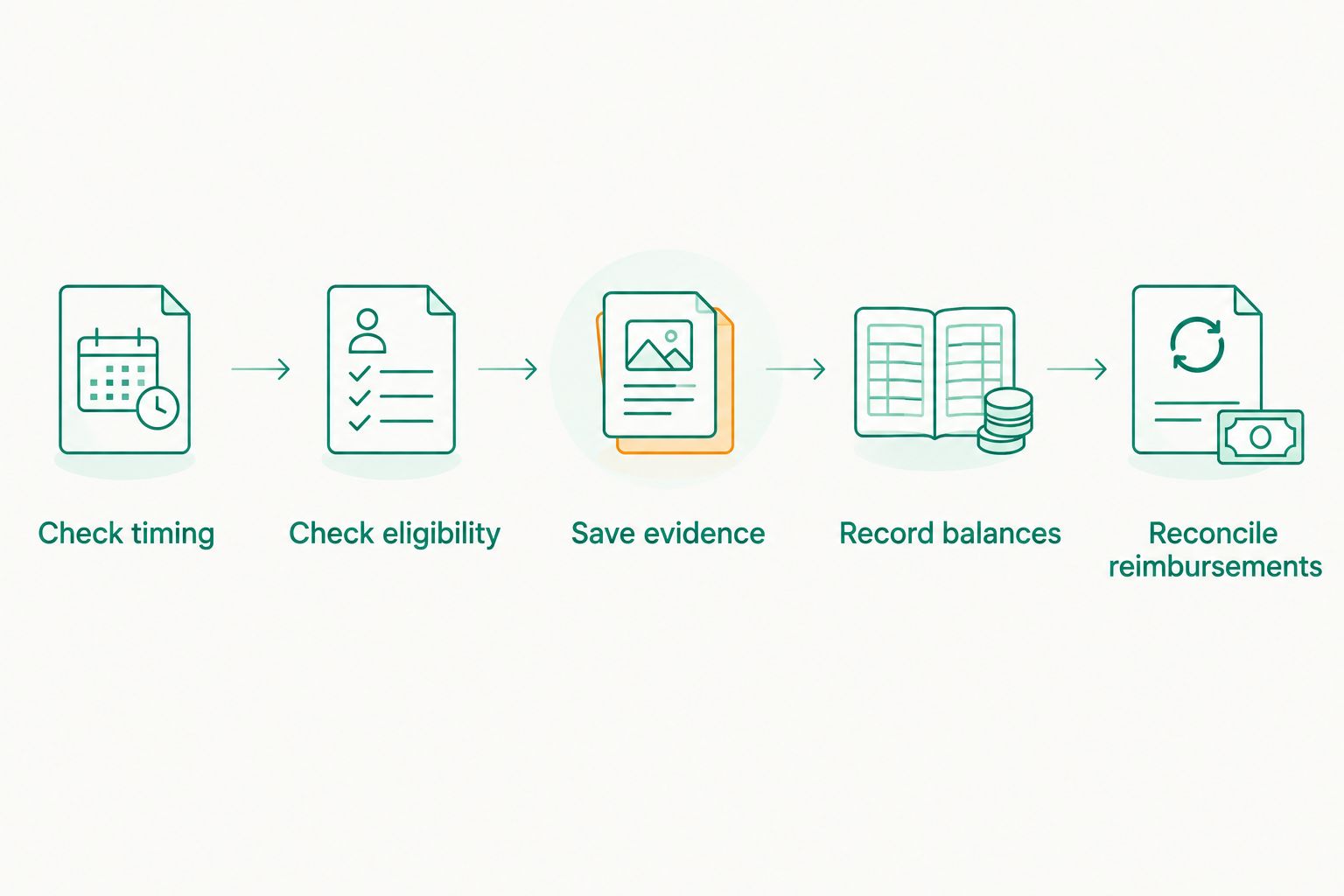
For a 2026 setup, use the same sequence whether you choose an app, spreadsheet or physical register.
- Check timing. Confirm the expense occurred after your HSA was established. Paying an older bill after opening the account does not make the earlier expense eligible.
- Check eligibility. Identify the medical item or service and the applicable IRS rule. A directory result supports research; it does not replace the underlying eligibility test.
- Save evidence. Retain the itemized bill or receipt, payment evidence and relevant insurance paperwork.
- Record balances. Track the qualified amount, reimbursements already taken and the amount still unreimbursed.
- Reconcile reimbursements. Match each HSA distribution to documented expenses and retain the record of that match.
The sequence protects against a common bookkeeping mistake: treating a payment transaction as complete proof of a qualified medical expense. You need the underlying details too.
For example, 1 expense can require 3 files: an itemized bill, payment confirmation and an insurance explanation of benefits. If you take 2 reimbursements against that expense, record both withdrawals and the remaining eligible amount.
Those counts describe an example, not an IRS document quota. The goal is enough evidence to substantiate your actual expense and distribution.
Apply HSA rules, not FSA deadlines
IRS Publication 969 explains HSA distributions and recordkeeping. IRS Publication 502 explains medical expenses, although HSA-specific rules still control HSA reimbursements; not every rule for an itemized medical deduction transfers unchanged to an HSA.
Under IRS HSA guidance, there is no federal time limit for reimbursing a qualified expense incurred after the HSA was established. Keep records for as long as you need them to support the later distribution.
An FSA follows different rules. Its coverage period and claim-submission deadlines matter, and any grace period or carryover depends on the plan. Do not apply the HSA’s delayed-reimbursement approach to an FSA.
Also exclude amounts reimbursed by insurance, an FSA or another source. You cannot reimburse the same amount twice or use an HSA reimbursement for an expense already taken as an itemized deduction.
A doctor’s letter does not automatically qualify a general-health purchase. The expense must satisfy the applicable medical-expense requirements; paperwork cannot turn ordinary wellness spending into qualified treatment by itself.
When staying with HealthEquity is the right call
Stay with HealthEquity if the account meets your needs and your existing receipt process produces complete, retrievable records. A new app is unnecessary when your current provider tools, spreadsheet or folders already do the job.
Before changing anything, open an older expense. Find its itemized documentation, payment evidence, insurance adjustment and reimbursement history. If you can establish the remaining eligible amount without reconstructing the transaction, your system is doing useful work.
For a 2026 decision, judge the workflow by that retrieval test—not by how many features appear on a comparison page.
FAQ
What's the best HealthEquity alternative for tracking HSA receipts?
Reimbursable is a fit for dedicated HSA receipt tracking, with unlimited free manual tracking and optional Premium automation. A spreadsheet with supporting receipt files is a legitimate alternative if you prefer maintaining your own ledger.
Do I need to leave HealthEquity to use another receipt tracker?
No. You can retain your HealthEquity HSA and use a separate system for receipt storage and expense tracking. Keep supporting documents and match reimbursements to eligible expenses.
Can I reimburse an HSA expense years after paying it?
Yes, federal HSA rules impose no time limit on reimbursement of qualifying expenses incurred after the HSA was established. The expense cannot also be reimbursed elsewhere or taken as an itemized deduction, and you must retain supporting records.
Is a spreadsheet enough for HSA receipt tracking?
A spreadsheet can be an effective expense ledger, but it does not replace supporting documents. Retain records showing the medical expense, payment, insurance reimbursement and any HSA reimbursement already taken.
Do I need Premium to receive tax-free HSA reimbursements?
No. Paid receipt automation is not a condition for tax-free HSA reimbursement. Eligibility, timing, documentation and avoiding duplicate tax benefits determine the treatment.
Does a doctor's letter make a general-health purchase HSA eligible?
No. A doctor's letter does not automatically qualify a general-health expense. The purchase must meet the applicable medical-expense rules based on its actual purpose and circumstances.
Can I save FSA receipts for reimbursement years later?
Do not apply the HSA's open-ended reimbursement timing to an FSA. FSA expenses and claims must satisfy the plan's coverage-period and submission rules, including any applicable grace period or carryover provisions.
One last thing
Before importing an entire archive into a new tool, test one complicated expense: an insurance adjustment, a mixed bill or a partial reimbursement. A system that handles only straightforward receipts has not yet solved your hardest recordkeeping problem.
Start free if manual tracking meets your needs. Consider Premium when scanning, bank sync or email forwarding removes work you otherwise leave unfinished—not because paid software is necessary for tax-free reimbursement.
Not tax advice. Always consult your tax advisor.